/ Finding Inspiration...
What first inspired me to create a portfolio website was finding the Aber Web-Ring and seeing personal portfolios/personal sites other students had created. I wanted my own space to share what I've made and put myself out there. All I needed now was a clear vision for what I wanted my site to be.
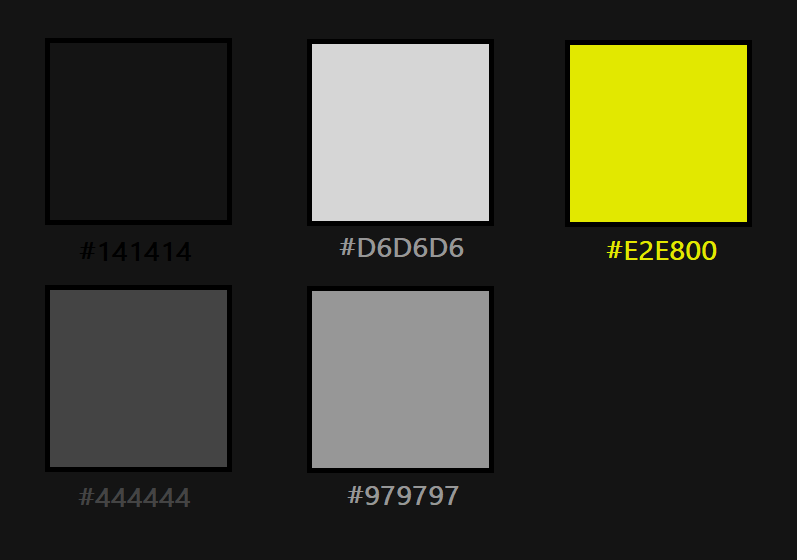
To find inspiration for the aesthetics of my website I made use of a collection of high-quality front-end websites on Awwwards, a platform that recognises talented designers and developers in the digital space. I eventually settled on a dark, slate-grey colour palette, with a bright yellow accent to break up the monochrome theming. I took some inspiration from The Smiler ride at Thorpe Park, specifically its industrial aesthetic and the way its bright yellow cuts through the predominantly dark surroundings. I also wanted to experiment with a custom font for this website. I decided to use Consolas, a monospace font commonly associated with command shells, reinforcing the technical. terminal-inspired aesthetic I was aiming for.
/ HTML, CSS and JavaScript
Once I had a clear idea of what I wanted my site to look like, it was time to start blocking out the structure and content of each page. I started with the navigation bar, a consistent element throughout the site that allows visitors to move between pages. I wanted to keep the structure simple but consistent across the various sections of the website. Using the nav-bar and a common layout improved cohesion, whilst still allowing each page to have its own distinct style. I also tried to incorporate more feedback from what the user does, making information cards grow on hover and adding animation to the title page to make it look like a console command. This was done in hopes of adding visual feedback through the site reacting to the users cursor.
For the blog page, I used JavaScript to create category filtering buttons. These toggle buttons allow visitors to filter blog posts by a topic (or multiple if multiple buttons are toggled on), hiding posts which dont match the selected categories. If no filter buttons are selected, all posts will be displayed.
/ What I Learned
I took the chance to create a Portfolio website to develop my design skills, looking at other sites and utilizing the MDN Web Docs to further improve my CSS skills. I learnt about responsive design using animations and Pseudo-classes in CSS. The toggle buttons also required me to improve my ability to change CSS classes using classList in JavaScript.